← At The Frontier · all sessions
At The Frontier · Session 01

Document
extraction

Methods for extracting text, tables and data from PDFs and scanned documents, and how to choose between them.

For
The DNA team
Snapshot
22 October 2026

Press → to start · O for overview · N for notes
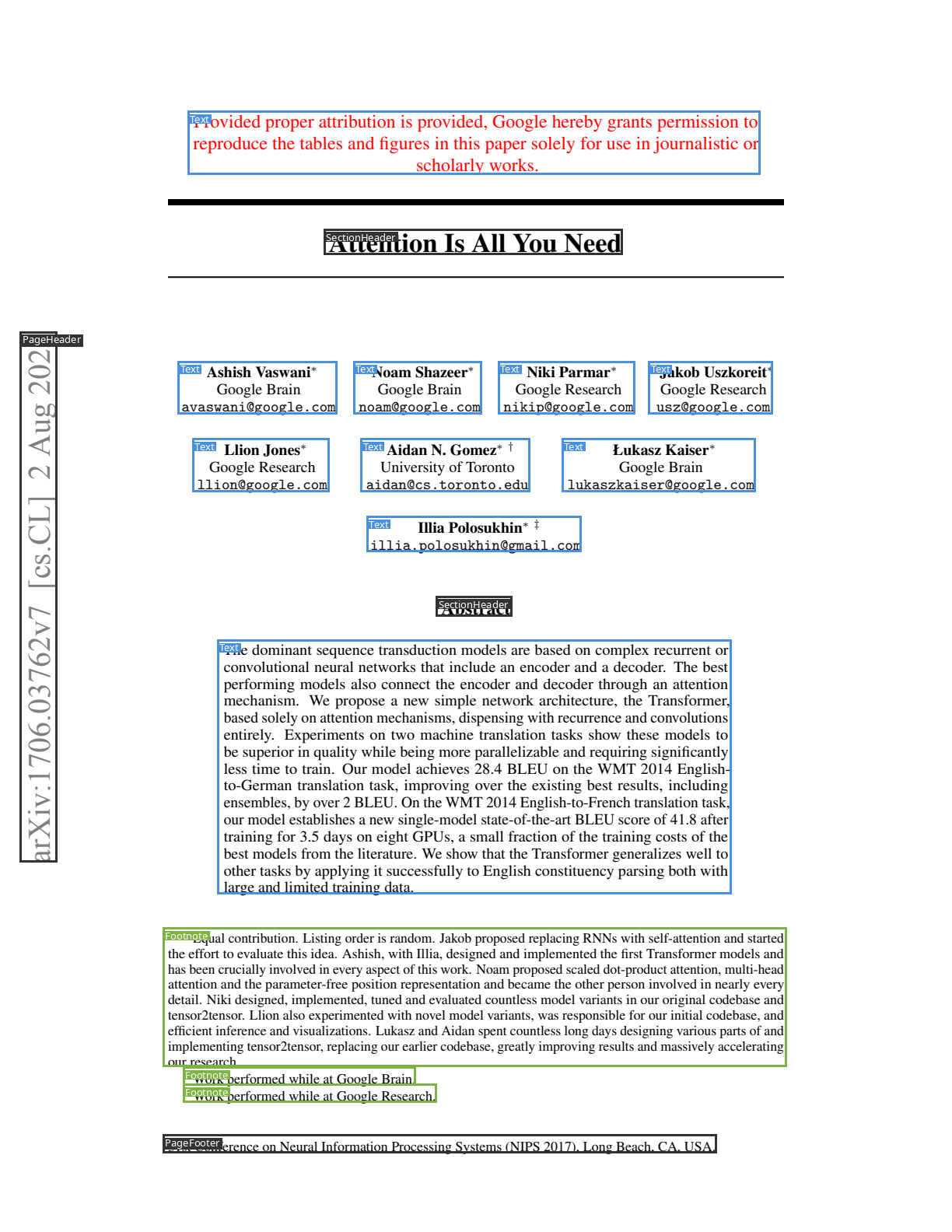
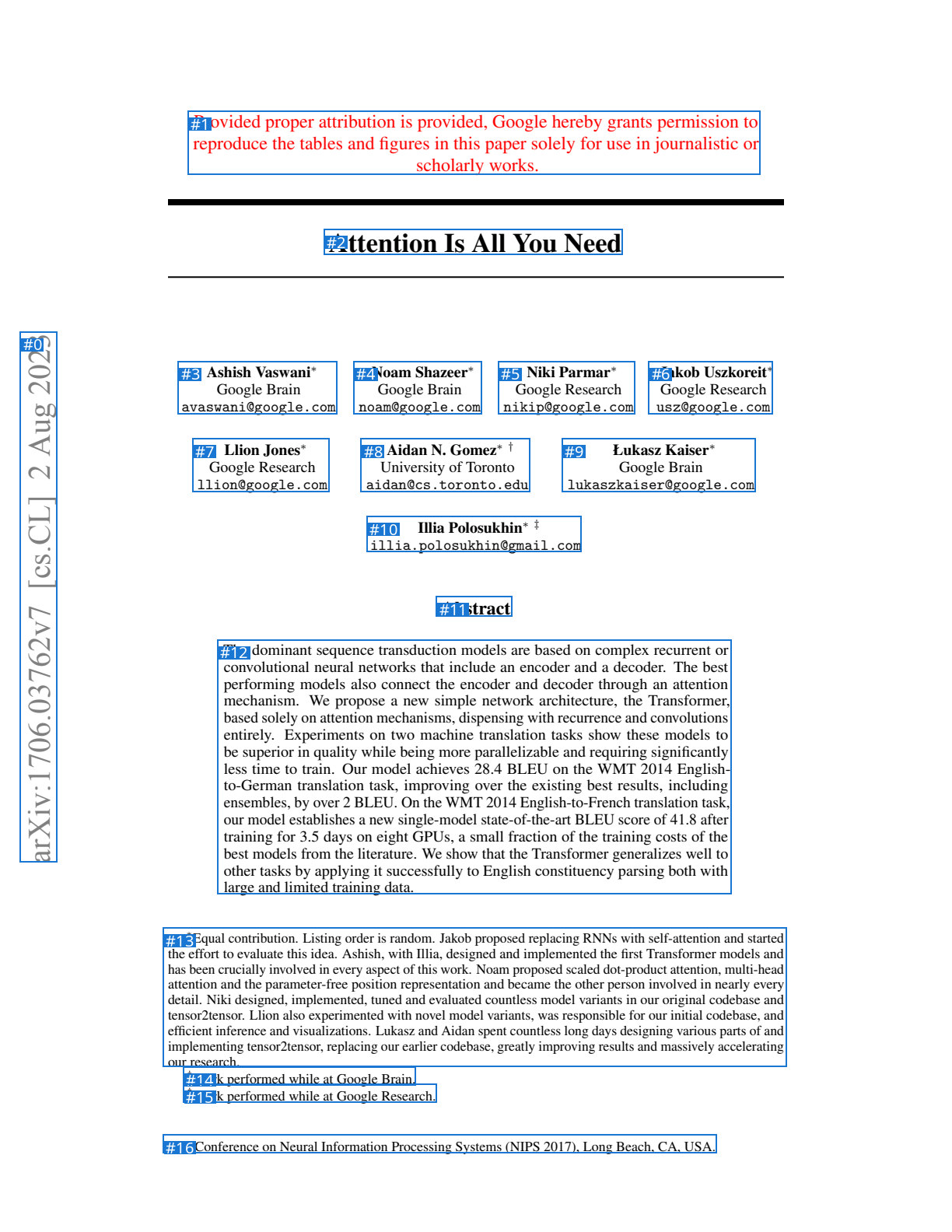
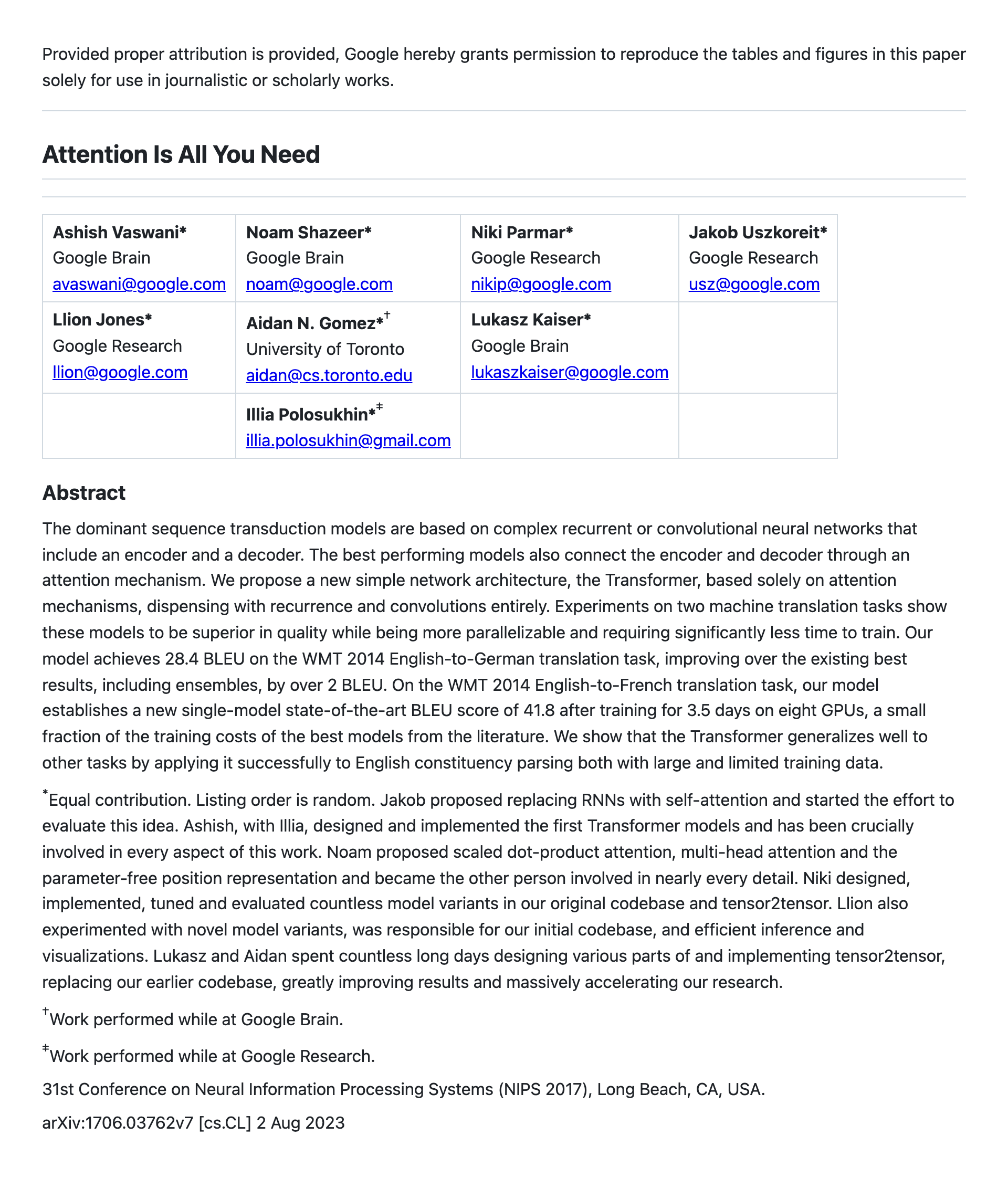
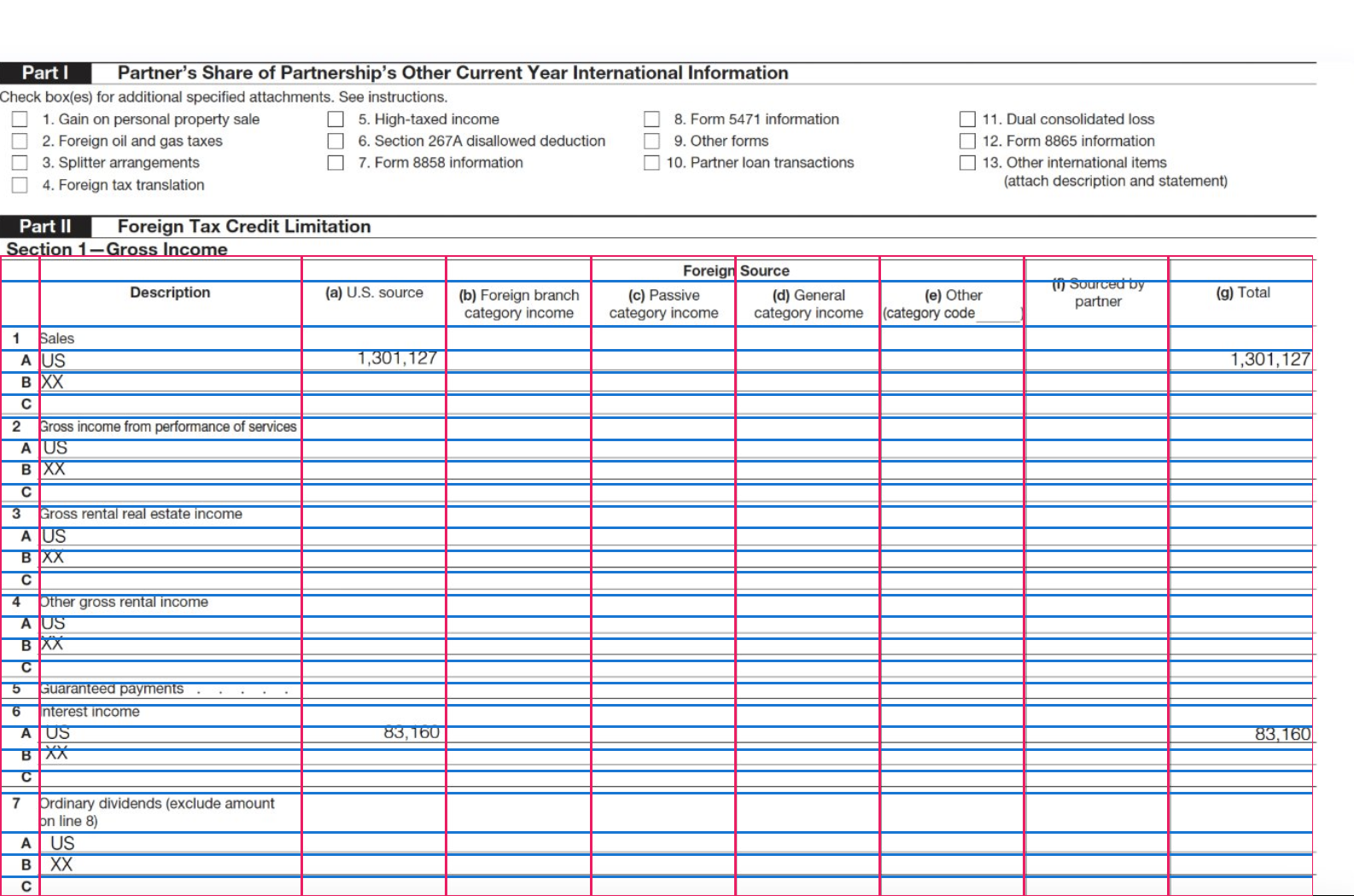
Surya layout detection on a research paper
Layout · SuryaBlocks
PageHeader1
SectionHeader2
Text10
Footnote3
PageFooter1
Image: Datalab, Surya layout detection
The question

"What is the best way to extract the contents of these PDFs?"

This is a frequent client question. The answer depends on the following factors.

How many?
Fifty contracts can be reviewed manually; five million pages cannot. Volume determines how much the cost per page matters.
Digital or scanned?
A PDF made from Word usually contains its text. A scan is an image; some scanned PDFs carry a hidden OCR text layer, which may contain errors.
How long, how complex?
Two-column layouts, footnotes, tables that cross pages, and 300-page documents all make it harder.
Tables, charts, handwriting?
These are where most methods fail, and where the newest models have improved most.
How accurate, how checkable?
Is 98% good enough? Do we need to point to where each value came from on the page?
Where can the data go?
Many clients can only use services running in their own Azure, Google Cloud or AWS account.
What is the output for?
Search and RAG need clean text. A database needs specific fields. A review team needs the source location.
Budget and speed?
Prices range from free to about $80 per 1,000 pages. Speed ranges from 1,000 pages a second to several seconds per page.
One-off or repeated?
A one-off job can use a general model. A pipeline that runs every day needs to be cheap and stable.
Introduction

Agenda

01

How we got here

The main developments since 1993, and why several approaches remain in use.

02

How each approach works

How each approach works internally, with real examples.

03

Who the players are

About 70 options, what they cost, and where they can run.

04

How they are measured

The main benchmarks, who runs them, and their limitations.

05

Where the frontier is

Quality against cost for everyday pages, hard pages and field extraction.

06

What to recommend

A decision guide, default picks, and how to test on a client's own documents.

A framework for comparison

Three questions for comparing approaches

Question 1

Where do the characters come from?

  • From the text already stored in the PDF
  • From a model that recognises characters in an image
  • From a model that reads the page image and generates the text
Question 2

Where does the structure come from?

  • Rules based on where text sits on the page
  • Separate models that find headings, columns and table cells
  • Learned inside one large model, with no separate step
Question 3

What can you check afterwards?

  • The exact position of every character
  • A box and a confidence score for each word or block
  • Sometimes only the final text, with no way to trace it back
Newer approaches generally handle difficult documents better, but cost more and produce output that is harder to verify. Several recent tools add verification features.
01 · How we got here

Development of document extraction, 1993–2026

1993–2017Rules and classic OCR
  • 1993PDF format launched. ABBYY FineReader 1.0.
  • 2005HP open-sources Tesseract OCR. Google backs it from 2006.
  • 2014–18Python PDF tools: pdfminer.six, pdfplumber, Camelot.
2018–2022Cloud services and layout models
  • 2018Tesseract 4 switches to a neural network (LSTM).
  • 2019AWS Textract and Azure Form Recognizer launch. Microsoft publishes LayoutLM.
  • 2020Google Document AI.
  • 2021–22Donut reads pages without OCR. DocLayNet and TableFormer from IBM.
2023–2024General models start reading
  • 2023Meta's Nougat turns papers into markup. GPT-4V can read images.
  • 2023–24Datalab releases Marker and Surya. IBM releases Docling. MinerU appears.
2025Small specialist models
  • FebolmOCR (AI2): about $176 per million pages.
  • MarMistral OCR API at $1 per 1,000 pages.
  • OctPaddleOCR-VL, DeepSeek-OCR, olmOCR 2, Chandra.
2026Hybrids with built-in checks
  • MarChandra 2. dots.mocr turns charts into code.
  • May–JulSurya 2, Marker 2, Mistral OCR 4 with word confidences.
  • OctChandra 2.5 returns chart values as tables. Gemini 3.8 Flash tops a major benchmark.
Earlier approaches remain in use. Python PDF libraries from the mid-2010s are still the most suitable option for some tasks.
02 · How each approach works

Five families of approach

Reads the file

PDF text libraries

Read the text the PDF already contains, then rebuild lines, columns and tables using rules about position.

pdfplumber · PyMuPDF
pdfminer · Camelot
≈ free
Reads pixels

Classic OCR

Find lines and words in an image, then recognise the characters one line at a time.

Tesseract · ABBYY
PaddleOCR (PP-OCR)
≈ free to cheap
Reads pixels + file

Cloud document services

OCR plus trained models for layout, tables and form fields, sold per page by the big clouds.

Azure Document Intelligence
AWS Textract · Google Document AI
$1.50–$50 / 1k pages
Reads pixels + file

Specialist document models

Small models trained only on documents. Some are pipelines of several models; others are a single model that converts the whole page image to text in one step.

Datalab (Marker, Chandra) · Docling
MinerU · PaddleOCR-VL · olmOCR · Mistral OCR
$0.10–$15 / 1k pages
Reads pixels

General vision language models

Large general-purpose models that take a page image and return text or JSON, following instructions.

Gemini · GPT · Claude · Qwen

$0.50–$80 / 1k pages
Exact and cheap, but brittle
Flexible, but can produce text that is not there
Family 1 · PDF text libraries

How a digital PDF stores text

% inside the page's content stream BT /F2 11 Tf1 0 0 1 46 590 Tm (1. Payment) Tj1 0 0 1 290 590 Tm (2. Termination) Tj/F1 10 Tf1 0 0 1 46 560 Tm [(The Client shall p)-12(ay all)] TJ1 0 0 1 290 560 Tm (Either party may end this) Tj1 0 0 1 46 536 Tm (invoices within 30 days) Tj1 0 0 1 290 536 Tm (agreement with 90 days') Tj1 0 0 1 46 512 Tm (of the invoice date.) Tj1 0 0 1 290 512 Tm (written notice.) TjET % Tm = set the text position, Tj/TJ = draw glyphs % Glyphs at positions, in the order the software chose. % No paragraphs, columns or tables unless the PDF is % tagged. Many files do not even store spaces.
Read across the page, line by line
1. Payment 2. Termination The Client shall pay all Either party may end this invoices within 30 days agreement with 90 days' …
Group into columns first
1. Payment The Client shall pay all invoices within 30 days of the invoice date. 2. Termination Either party may …
Family 1 · PDF text libraries

How PDF libraries reconstruct structure
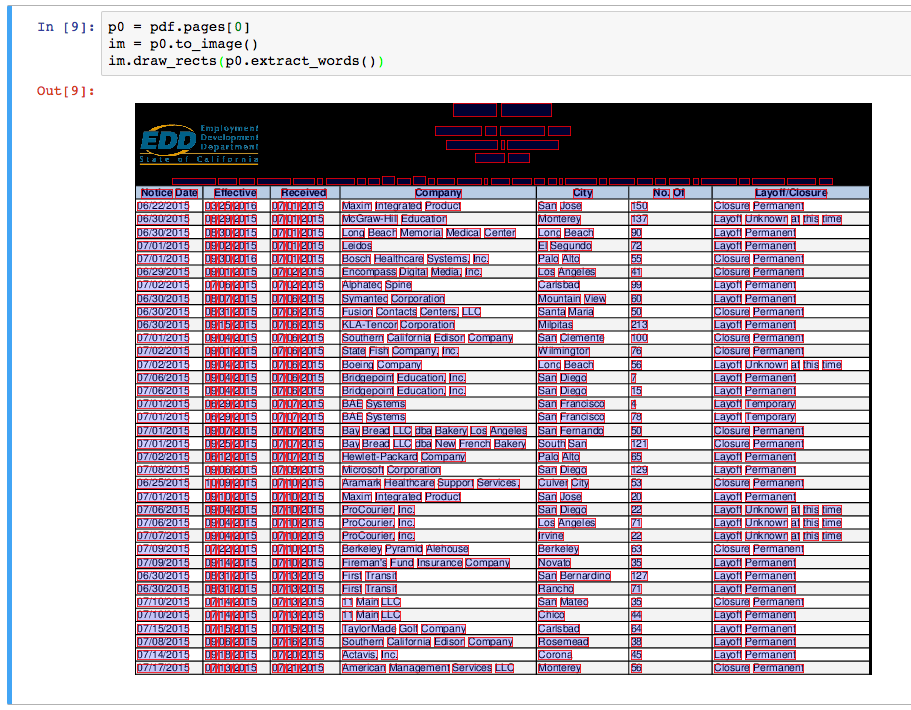
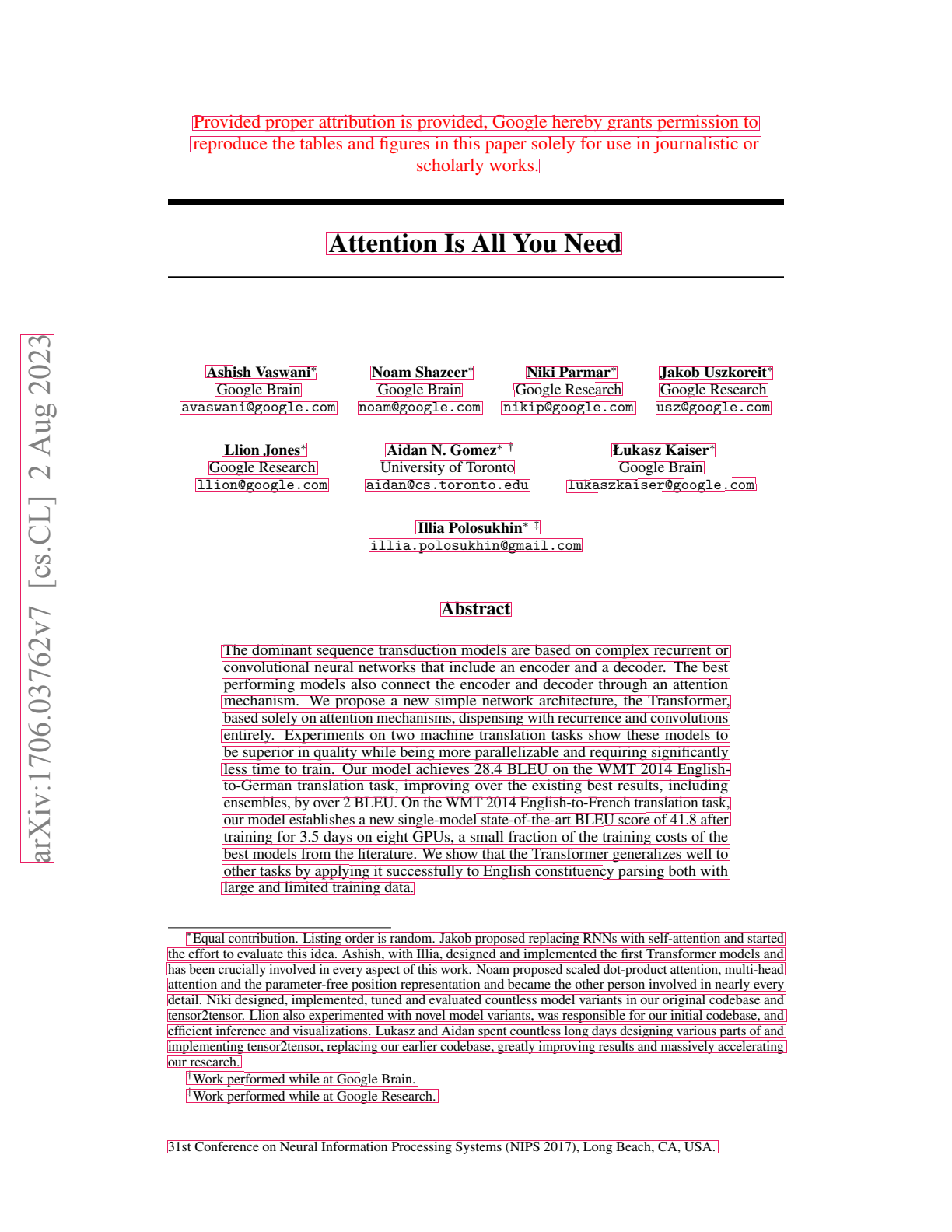
pdfplumber word boxes
pdfplumber: every word with its exact box. Image: pdfplumber (MIT)
Camelot step 1: find the ruling lines in a rendered image
Camelot step 2: find where lines cross
Camelot step 3: build the cell grid, then drop each word into its cell. Images: Camelot docs (MIT)
Good at
  • The characters stored in the file, with exact positions, and no new recognition step
  • Milliseconds per page on a laptop, so millions of pages cost almost nothing
  • Completely repeatable and easy to audit
Bad at
  • Scans with no text layer, or a poor hidden OCR layer
  • Text layers that are garbled, incomplete or wrong
  • Columns, headers and footnotes in the wrong order
  • Tables without ruling lines, and tables that span pages
  • Maths, and files with broken font maps
On one benchmark a pure text-layer tool scores 20. Adding a small layout model raises it to 44, at 24 pages a second on a CPU.
olmOCR-Bench figures from the Marker README (Datalab, vendor-run)
Family 2 · Classic OCR

How classic OCR works

Clean the imageConvert to black and white. Remove noise and shading.
Straighten itDetect the angle of the text and rotate the page level.
Find the linesLook for horizontal bands of ink.
Find the wordsSplit each line at the gaps. Each word gets a box.
Recognise the charactersSince 2018, Tesseract reads a whole line at once with a small neural network (an LSTM). Each word gets a confidence score.
Family 3 · Cloud document services

Cloud document services and pricing

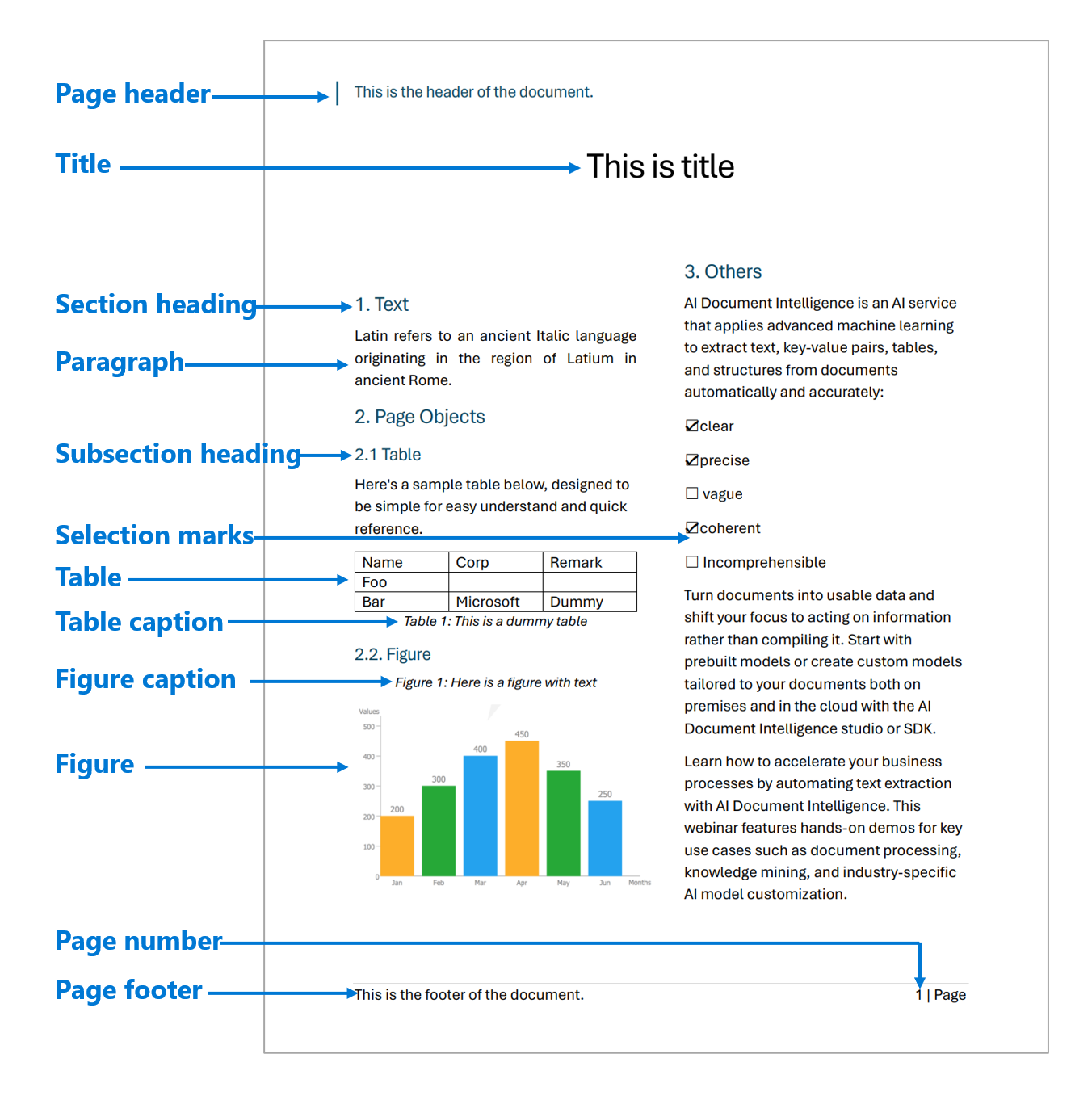
Azure Document Intelligence layout roles
Azure Document Intelligence: page roles found by its layout model. Image: Microsoft Learn

Azure, AWS and Google offer similar services. Each layer is a separately trained model, and each costs more per page.

OCR: words, boxes, confidence$1.50
Layout: headings, paragraphs, reading order$4–10
Tables: rows, columns, merged cells$10–15
Custom fields, trained on your documents$30–40
Forms: key–value pairs, checkboxes$30–50

List prices per 1,000 pages, first volume tier, checked 22 Oct 2026. Azure Retail Prices API, AWS Price List, Google Document AI pricing page.

Good at
  • Boxes and confidence on everything
  • Runs inside the client's own cloud
  • Mature, with service agreements
Bad at
  • Complex financial tables, charts, maths
  • Output is a large JSON graph to walk
  • Costs add up as you add layers
Two ideas from research

Two influential research results

2019 · LayoutLM, Microsoft

Using word positions as model input

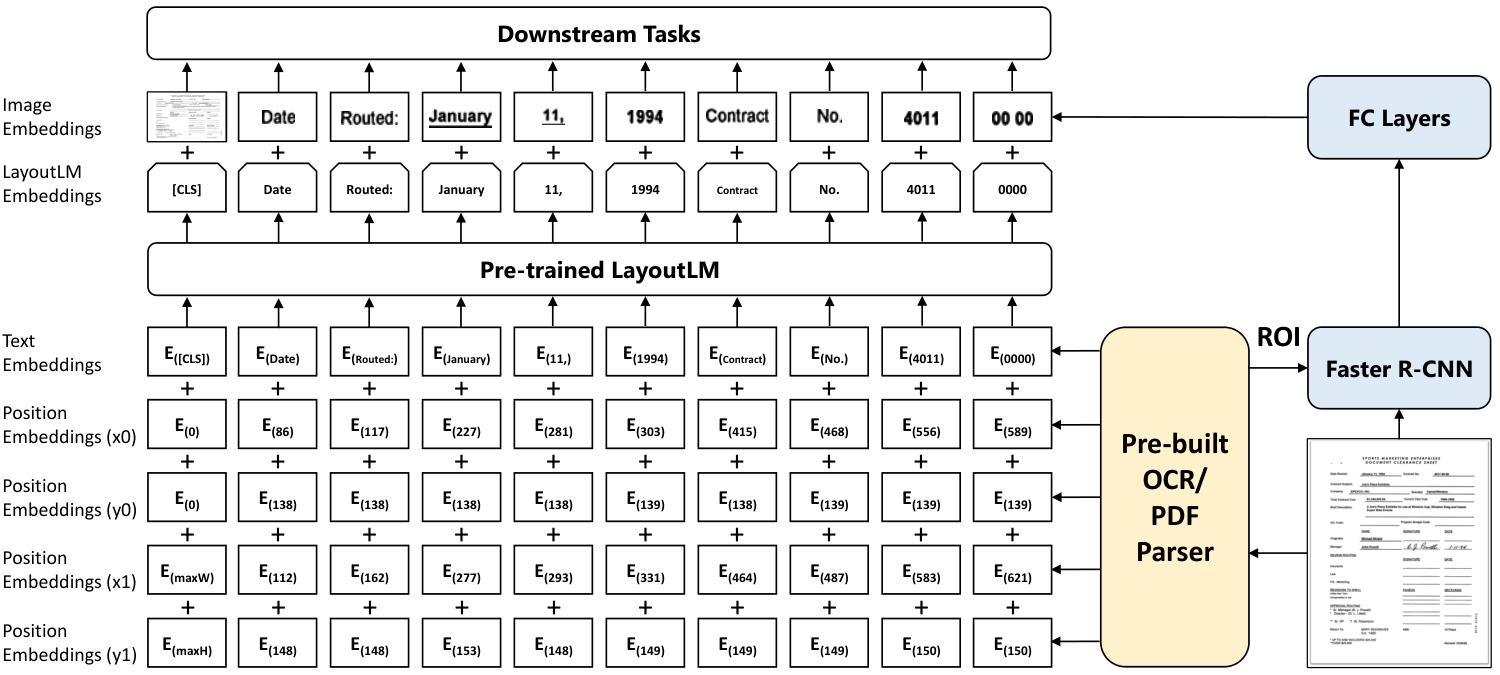
LayoutLM architecture
Each word is fed in with its box coordinates. Image: Xu et al., arXiv 1912.13318

A number to the right of "Total" is probably the total. Feeding positions into a language model made form and invoice extraction much better.

2021 · Donut, NAVER Clova

Generating output directly from the image
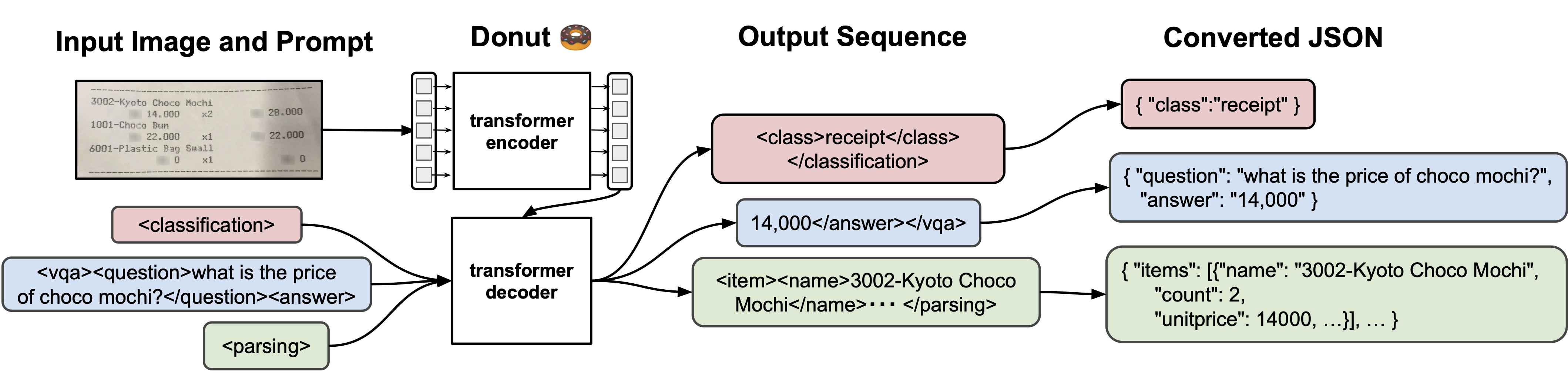
Donut overview
Image in, structured text out, in one model. Image: Kim et al. (MIT)

This switched the task from recognising characters to generating text. It handles difficult pages better, but it can also produce text that is not on the page.

Meta's Nougat (2023) demonstrated this risk: on unfamiliar pages it repeated itself or generated text that was not on the page. Current generative models carry the same risk.
Family 4 · Specialist document models

Three designs of specialist model

Design A

A pipeline of small models

Separate models for layout, tables, formulas and OCR, joined by code. Uses the PDF's own text where it can.
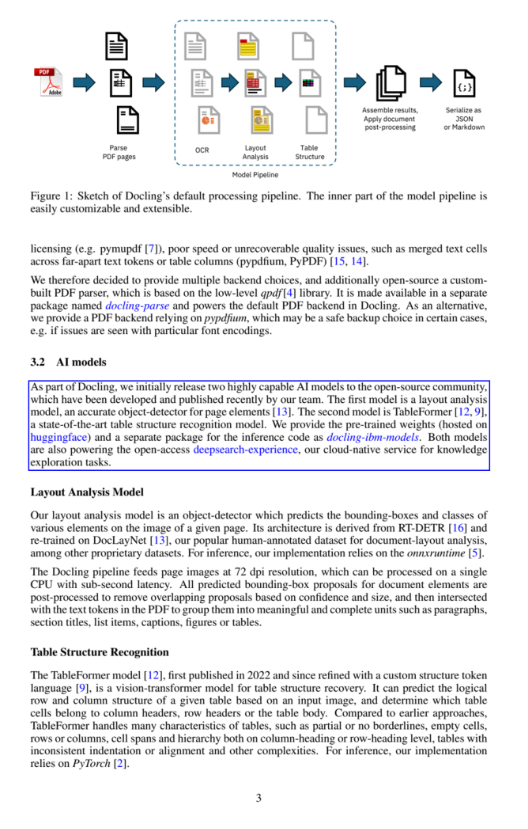
Docling pipeline
Docling · Marker "fast" · MinerU pipeline · PP-StructureV3
Design B

Layout first, then read each block

Find the blocks on a small, low-resolution copy of the page. Then read each block at full resolution.
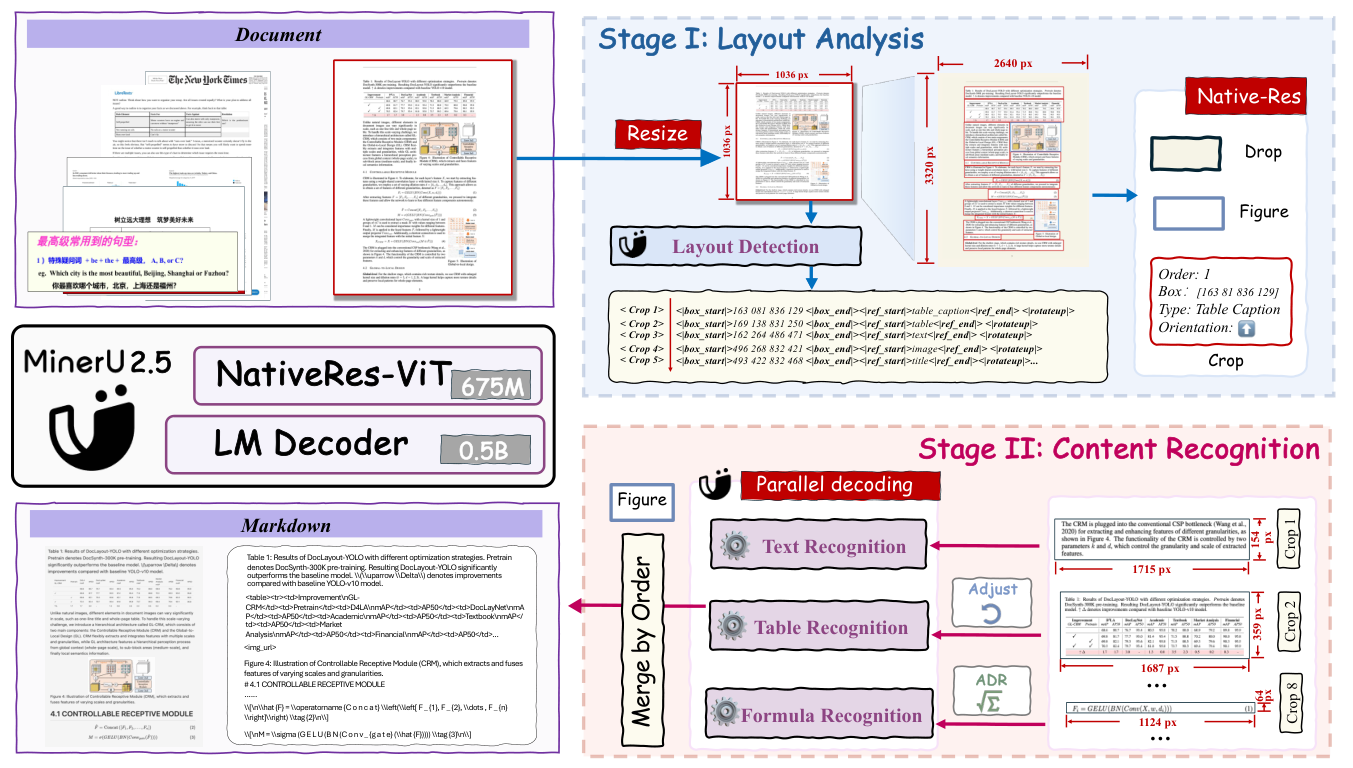
MinerU 2.5 two-stage
MinerU 2.5 · PaddleOCR-VL · Surya 2 · Marker 2
Design C

A single model converts the whole page

A small vision language model (1–9 billion parameters) takes the page image and outputs the full page as markdown or HTML, often with block positions.
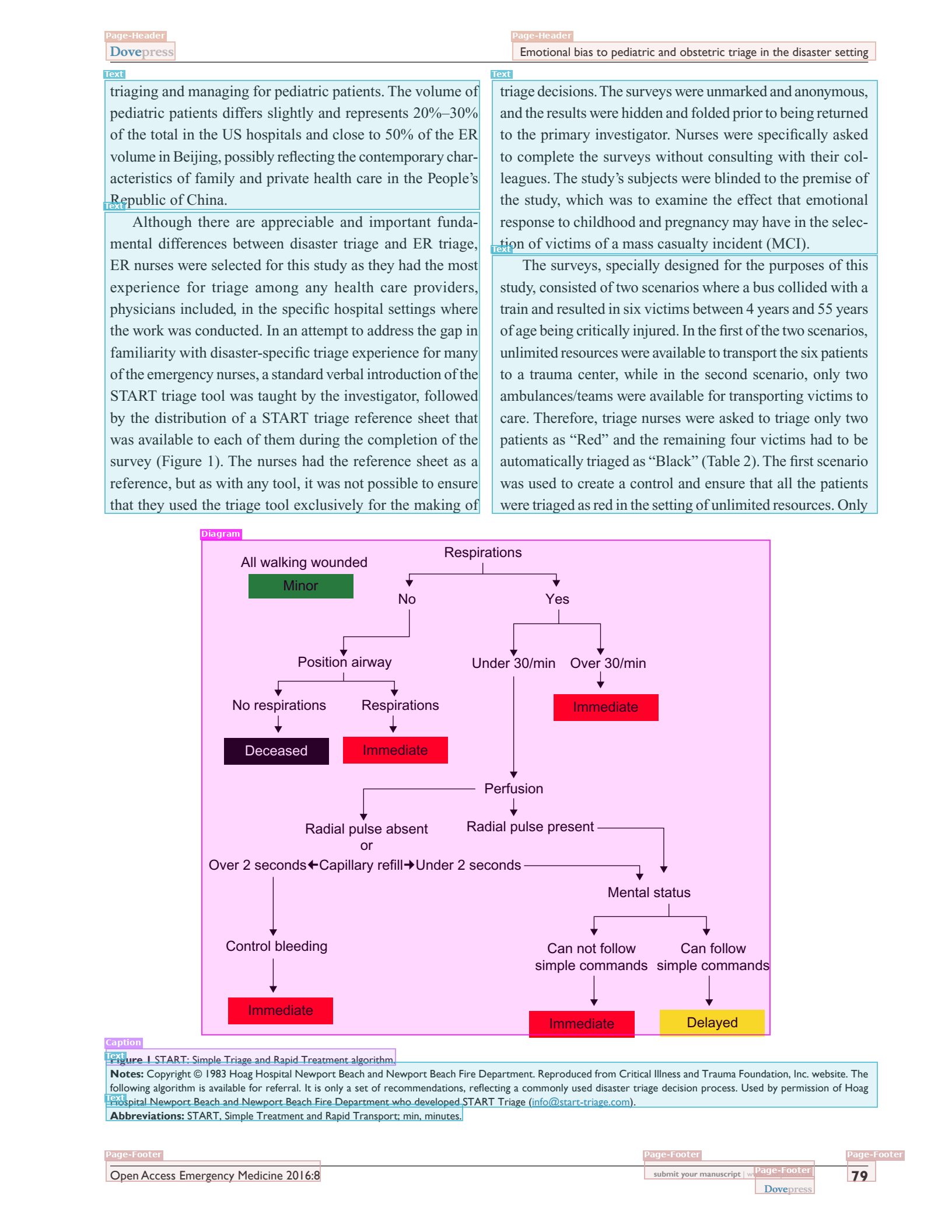
Chandra 2 blocks
Chandra · olmOCR · dots.ocr · DeepSeek-OCR · Mistral OCR

Images: IBM Docling (MIT), OpenDataLab MinerU2.5 (arXiv 2509.22186), Datalab Chandra 2 blog. Click to zoom.

Family 4 · Inside a pipeline

The stages of a document pipeline

Text line detection
Layout detection
Reading order
OCR output
Table recognition
Find every line of textA detection model marks where text is, without reading it yet.
Label the blocksA layout model tags each region: section header, text, footnote, page header, table, figure.
Decide the reading orderNumber the blocks in the order a person would read them. This resolves the multi-column problem.
Read the textOCR each line, or reuse the PDF's own text where it is good.
Rebuild the tablesFind rows, columns and cells, then place the text in them.

Images: Datalab Surya README (GitHub). Surya 2 (May 2026) now does layout, OCR and tables in one 650M-parameter model, and gives each block a confidence score.

Family 4 · Reducing cost

Reducing the number of tokens per page
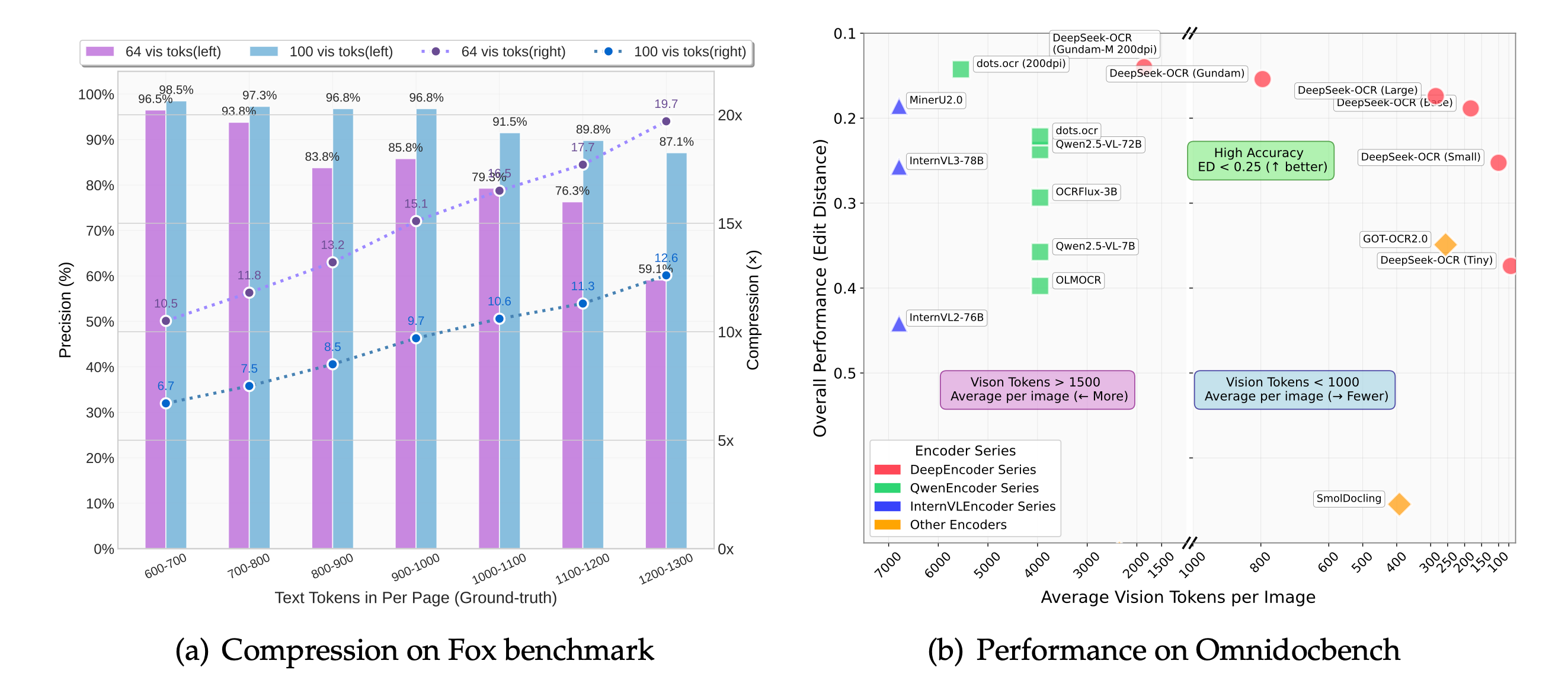
DeepSeek-OCR compression results
Left: accuracy against compression. Right: accuracy against image tokens per page, by model. Image: DeepSeek-AI, DeepSeek-OCR (arXiv 2510.18234)
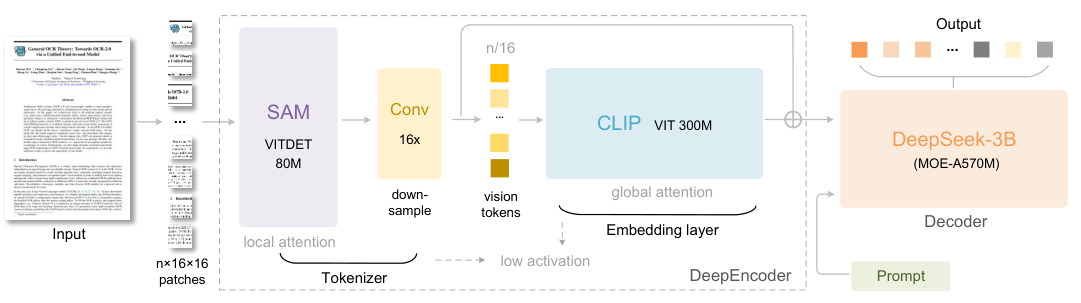
DeepSeek-OCR encoder
The encoder compresses image patches 16 times before the language model sees them.

DeepSeek-OCR (Oct 2025) tested how few tokens are needed to represent a page.

64–400
image tokens per page, depending on mode
~97%
accuracy with up to 10× compression
200k
pages a day on one A100 GPU

Compare a general model, which uses 560 to 2,700 image tokens per page. Fewer tokens reduce cost and processing time. Together with smaller models, this explains why self-hosted costs are now $0.10–0.70 per 1,000 pages in GPU time.

Family 5 · General vision language models

How a general model reads a page

1. Cut into patchesThe page image is split into small squares, 28–32 pixels across.
→
2. Patches become tokensA vision encoder turns patches into "image tokens".
→
3. The model generates textThe language model produces the output text one token at a time.
The model has no separate character recognition step. Reading, layout and interpretation all take place through next-token prediction. As a result, it handles handwriting and charts well but can produce fluent text that is not on the page.
Family 5 · Cost

Cost per page for general models

Model familyImage tokens per pageHow it is counted
Gemini 3.x560 (PDF) · 1,120 (image)Fixed per page. PDF text is free. Google says OCR quality "typically saturates" at 560.
Claude 5.5~2,700One token per 28×28 pixel patch, up to 4,784
GPT-5.4 and later~2,50032×32 patches × 1.2
DeepSeek-OCR64–400Compressed by design

US Letter page at 150 DPI. Our arithmetic from each provider's documented formula, Oct 2026.

A page of output is about 800 tokens, and output tokens cost 4–8× more than input tokens. "Thinking" tokens also count as output, and can multiply the cost by 2–5×. Disable thinking for transcription tasks.
Calculator

Per 1,000 pages
–
Total for this job
–
Input (page image + prompt)Output (the extracted text)

Families 4 and 5 · Generative models

Strengths of generative models

Bar chart
"axes": "x: year; y: salary ($)",
"data": "<table>… 2010 | ~66,000 …",
"description": "Average salary
  fell, then recovered…"

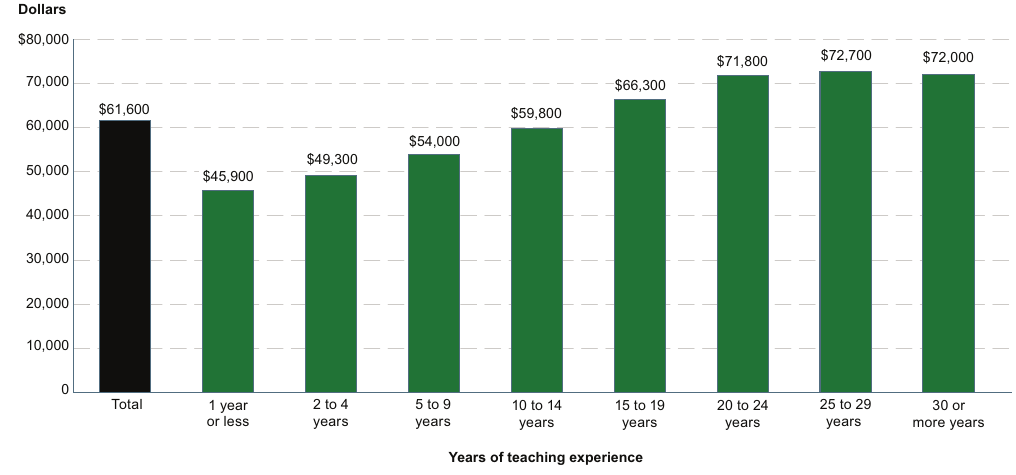
Chart data extraction

Values are read off the axes, marked "~" when estimated. OCR can only return the axis labels. Example from Chandra 2.5, a specialist model; general models such as Gemini and Claude handle the same cases. Image: Datalab blog.
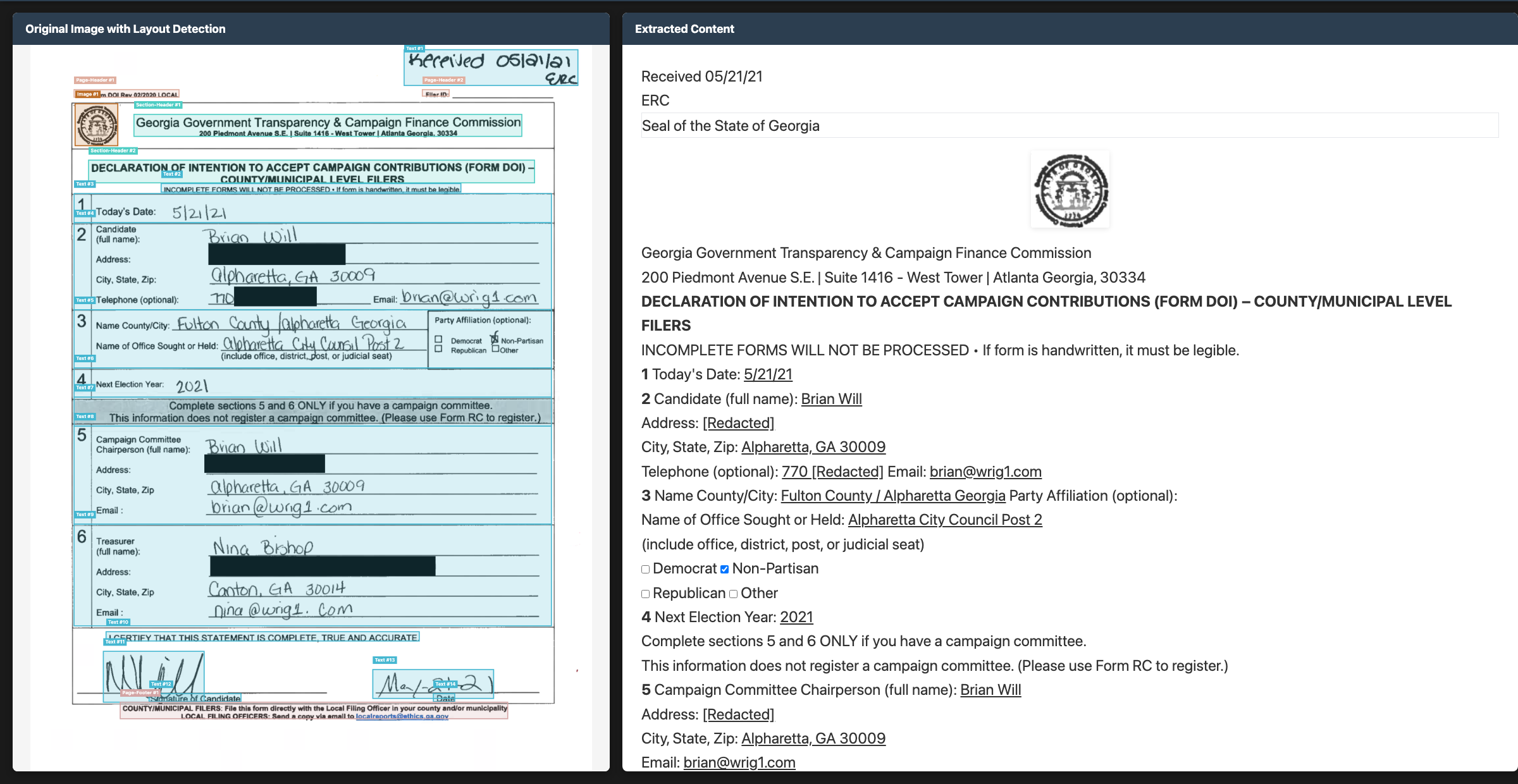
Handwritten form

Handwriting and forms

Handwriting, ticked boxes, stamps and photographs of documents. Training on large and varied data allows these models to read partly legible words. Example from Chandra, a specialist model. Image: Datalab README.

{
  "party_a": "Acme Ltd",
  "party_b": "Example Services LLC",
  "notice_period_days": 90,
  "payment_terms_days": 30,
  "governing_law": null,
  "auto_renews": null
}
// null = not stated on the page.
// Never default a missing value to false.

Direct extraction of specified fields

Fields from the slide 7 contract. Use the provider's structured-output mode with a schema: the output then matches the schema's format, but values can still be wrong and responses can be refused or cut off. Validate before use.

Family 5 · Weaknesses

Weaknesses of general models

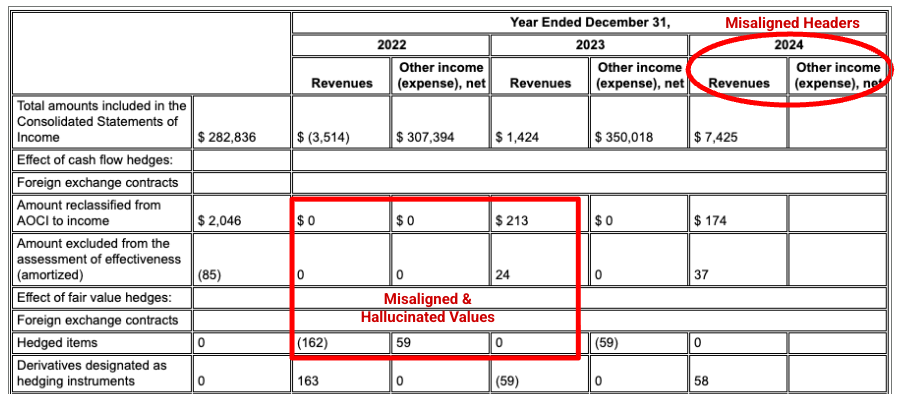
Misaligned and hallucinated table values
A generative parser shifts the column headers and invents values in a 10-K table. Image: Google Cloud Document AI docs, comparing an unnamed competitor.
On a 121-page set of deliberately hard pages, Datalab found that a single pass of a raw model produced errors or degenerate output on about 61% of pages. With retries and checks, this fell to nearly zero.
Datalab anti-hallucination blog, vendor-run
What happensWhy
It corrects the textThe model favours likely words, so it corrects typos, normalises dates and fills gaps.
It leaves things outIt hits its output limit, skips repeated rows or summarises. The request still succeeds: check the finish reason and compare row counts.
It repeats itselfIt can loop on dense or unusual pages.
It misreads small printThe page image is reduced to fit the model's size limit, which can make small text illegible.
Errors on long documentsWhen many pages are sent in one request, content from different pages can be mixed up. Parse page by page, then combine the results and reconcile values that span pages.
No confidence scoresThe output does not show which parts are uncertain, so reviewers cannot tell where to check. If asked for word or block locations, the model generates approximate coordinates rather than measuring them from the page.
Results changeProviders update models under the same name, and outputs can differ between runs even at temperature 0.
Recent developments

Verification features in recent tools

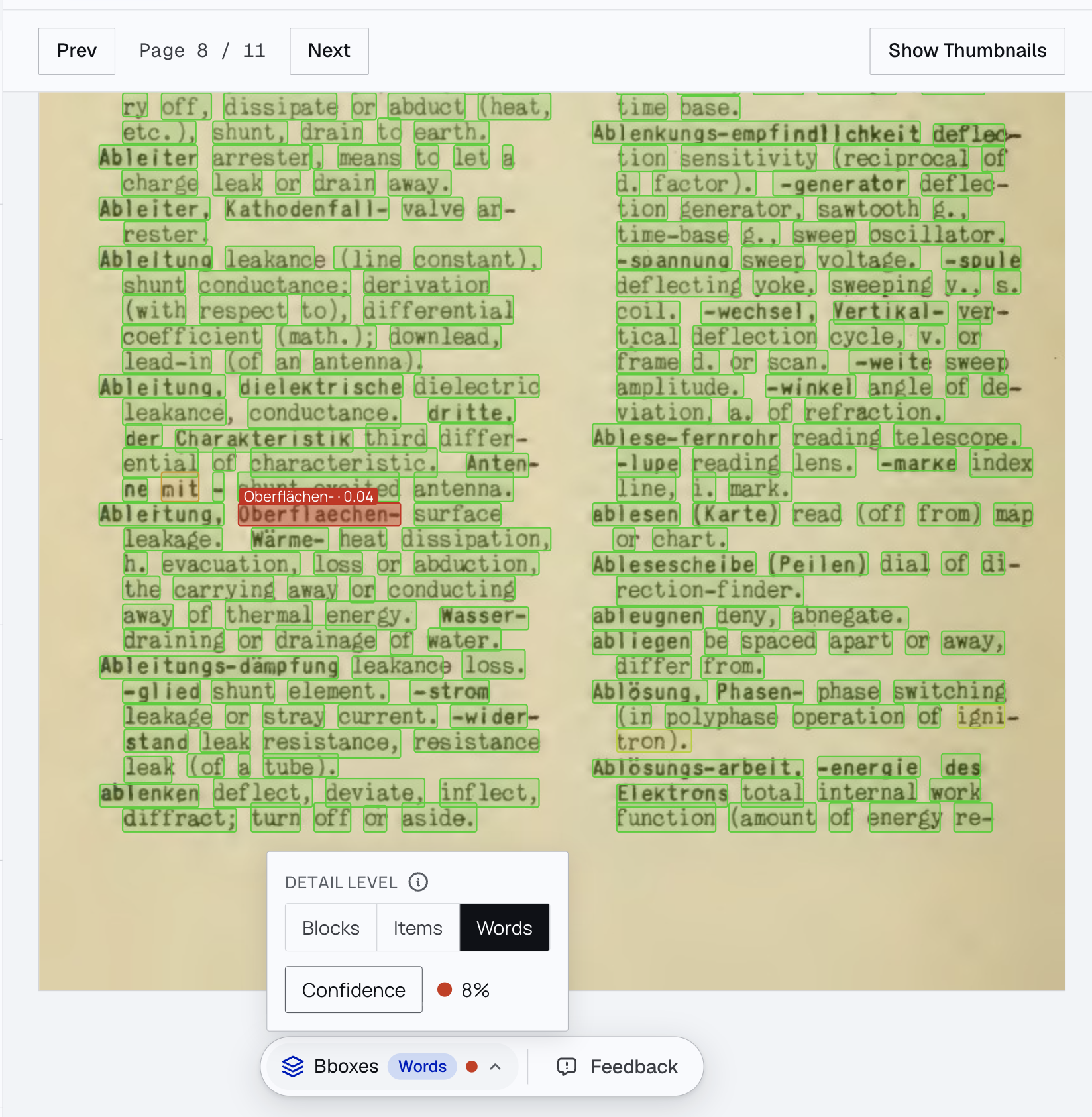
Word confidence boxes
Every word has a box and a confidence score. The one doubtful word (0.04) is flagged for review. Image: Datalab.
  • Use the PDF's own text when it is good. Only read pixels where it is missing or broken. (Marker, Docling, Gemini and Claude with PDF input)
  • Detect layout at low resolution and read text at full resolution. (MinerU, PaddleOCR-VL)
  • Small model to transcribe, large model only for meaning. (Marker with an LLM, Google Layout Parser)
  • Check, retry and flag uncertainty. Re-read doubtful blocks and mark text "[illegible]" instead of guessing. (Datalab)
  • Return source positions. Mistral OCR 4, Chandra and Docling all return boxes, so a reviewer can see where each value came from.
Summary

Comparison of the five families

PDF text librariesClassic OCRCloud servicesSpecialist modelsGeneral VLMs
Digital PDFs●●●●●●●●●●●●●●●●●●●●●●●●●
Scans and photos●●●●●●●●●●●●●●●●●●●●●●●●●
Complex tables●●●●●●●●●●●●●●●●●●●●●●●●●
Charts and handwriting●●●●●●●●●●●●●●●●●●●●●●●●●
Positions you can check●●●●●●●●●●●●●●●●●●●●●●●●●
Risk of invented textNoneVery lowLowLow to mediumMedium
Cost per 1,000 pages≈ $0≈ $0$1.50–50$0.10–15$0.50–80
Pages per second100s–1,000s~0.2–50 (CPU)Async batches1–7 per GPURate limited

Our summary judgement from the research in this session, not a benchmark result. Ratings are for a typical good tool in each family.

03 · Who the players are

Products, models and where they run

Show
03 · Price

Price per 1,000 pages

List price per 1,000 pages, standard (not batch) tier, checked 22 Oct 2026. General model costs are our estimate: one US Letter page at 150 DPI, 300 prompt tokens, 800 output tokens, no thinking. Self-hosted costs are GPU time only, using publisher throughput at $2.50 per GPU hour.

03 · Watch-outs

Licence and pricing considerations

Licence restrictions on open models

ModelRestriction
Marker, Surya (Datalab)Model weights free only if revenue and funding are under $5M
Chandra (Datalab)Free only under $2M, and not to compete with Datalab's API
MinerUNeeds a commercial licence above $20M monthly revenue
HunyuanOCR (Tencent)Licence excludes the EU, UK and South Korea
Nanonets-OCR2No licence stated; base model is research-only
PyMuPDFAGPL: closed products need a paid licence

Options with permissive licences: Docling, PaddleOCR-VL, olmOCR, DeepSeek-OCR, dots.ocr, GLM-OCR, LightOnOCR, Qwen3-VL.

Scheduled and recent price changes

  • Gemini 3.8 and 3.6 Flash double on 1 January 2027 ($0.75 → $1.50 per million input tokens).
  • Gemini 4 Argon doubles on 1 December 2026.
  • GPT-5.6 Sol is on a promotional price until at least 21 November 2026.
  • Mistral OCR has gone from $1 to $2 to $4 per 1,000 pages across three versions.
  • Batch APIs from OpenAI, Anthropic, Google, Mistral and Bedrock halve prices for jobs that can wait.
  • Thinking tokens are charged as output and can multiply a general model's cost by 2–5×.

Licences from GitHub READMEs, Hugging Face model cards and the Datalab pricing FAQ. Prices from vendor pricing pages, 22 Oct 2026.

03 · By client cloud

Options by cloud provider

Microsoft Azure

Azure clients

  • Document Intelligence: Read, Layout, prebuilt and custom models
  • Content Understanding (generative)
  • Mistral OCR 4 and Mistral Document AI in Foundry (confirm the hosting option and region)
  • GPT models in Azure OpenAI
  • Claude in Foundry, using the hosted-on-Azure option
Amazon Web Services

AWS clients

  • Textract: OCR, layout, tables, forms, queries
  • Bedrock Data Automation
  • Claude, Qwen3-VL, GPT-6 Astra, Nova on Bedrock
  • DeepSeek-OCR and Upstage deployed into your account through SageMaker
  • Billing only, vendor-hosted: Reducto, LlamaParse and Unstructured on AWS Marketplace
Google Cloud

Google Cloud clients

  • Document AI: OCR, Layout Parser (uses Gemini; some versions use a global endpoint), Form Parser, custom extractors
  • Gemini (only available here)
  • Claude on Vertex AI
  • DeepSeek-OCR and an older Mistral OCR in Model Garden
Any open-weights model can also run on a GPU in the client's own account. Datalab has no marketplace listing but offers an enterprise version inside the client's cloud. Databricks and Snowflake have their own document parsing functions.
04 · How they are measured

How benchmarks score results

The page says
Total due: $4,250.00
Payment within 30 days.
A parser returns
**Total due:** $4,250
Payment within 30 days.

Whether this is correct depends on the scoring method.

MethodHow it worksVerdict hereUsed by
Edit distanceCount the characters you would need to change to match the answer keyPenalised for "**" and the missing ".00"OmniDocBench
Pass/fail testsHundreds of small checks: "is this text present?", "does A come before B?", "is this value in the cell under this heading?"Text present: pass. Exact amount: failolmOCR-Bench, OmniParseBench
Table similarityCompare the structure of rows, columns and cells as a treeNot a table, not scoredOmniDocBench, ParseBench, RD-TableBench
Field accuracyExtract named fields to JSON and compare valuestotal_due = 4250: passExtractBench, OmniExtractBench
Judges and votesAn LLM or people pick the better of two outputsLikely preferred for its formattingOCR Arena, older Datalab pages
04 · The main benchmarks

The main benchmarks

BenchmarkRun byIndependent?What it testsSizeLatestCost shown?
OmniParseBenchDatalabVendorText, tables and layout as pass/fail tests, tagged by difficulty16,288 tests, 2,937 pages, 92 languagesOct 2026 (new)Yes
ParseBenchLlamaIndexVendorTables, charts, content, formatting, grounding on enterprise documents~2,078 pages, 148 systemsLive, Oct 2026Yes
ExtractBenchLlamaIndex + KaggleVendorFields to JSON, short to long documents370 docs, 4,869 pagesLive, Oct 2026Yes
olmOCR-BenchAI2SemiPass/fail tests on papers, old scans, tables, maths1,403 PDFs, 7,010 testsFrozen 2025; now saturated2025 plot
OmniDocBenchOpenDataLab (MinerU team)MostlyText, reading order, tables, formulas1,651 pages, ~50% Chinesev1.6, Sep 2026No
OCRBench v2HUST and partnersYesRecognition, extraction, parsing, with a private test set10k public + 1.5k privateQuarterly, Sep 2026No
IDP LeaderboardNanonetsVendorOCR, tables, key fields, Q&ACombines 3 benchmarksMar 2026Some
RD-TableBenchReductoVendorComplex tables1,000 tables2024No
RealDoc-BenchExtendVendorAnswering questions from parsed real documents581 docsJun–Aug 2026Yes
DocVQA / DocVQA 2026CVC BarcelonaYesAnswering questions about documents50k Qs / 160 QsSaturated / Sep 2026No
OCR ArenaExtendVendorPeople vote between two outputsUser uploadsLiveNo

Research pack C, checked 22 Oct 2026. Full tables and links in the repository.

04 · Datalab's latest benchmark

Datalab's OmniParseBench

  • Nov 2025. Datalab says olmOCR-Bench is saturated. When Gemini re-checked failed tests, Chandra's score rose from 85.5 to 93.9. Many failures were caused by errors in the tests.
  • Oct 2026. Datalab launches OmniParseBench: 16,288 pass/fail tests, open scoring code, and every system's result on every test published.
  • Two views. The headline measures reliability on typical content. Tags (handwriting, degraded, rotated, tiny text, non-Latin) show the very hard cases.
Plain pages: the top 10 commercial systems score 83–93%. Handwriting: 42–81%.

OmniParseBench pass rates by slice, run 8 Oct 2026. Slices computed by our researcher from Datalab's public per-test results file. * Gemini 3.8 Flash and Claude Sonnet 5.5 helped create some tests.

04 · Strengths and limits

Strengths and limitations of benchmarks

BenchmarkPublisherLeading product on cost frontier
OmniParseBenchDatalabDatalab
OmniExtractBenchDatalabDatalab
ParseBenchLlamaIndexLlamaParse
ExtractBenchLlamaIndexLlamaExtract
IDP LeaderboardNanonetsNanonets OCR-3
LongExtractionBenchmicro1 for ReductoReducto
RealDoc-BenchExtendExtend
Results on other vendors' benchmarks differ. Datalab is 45th on LlamaIndex's ParseBench. LlamaParse is 5th on Datalab's OmniParseBench.

Limitations

  • Tuning to the benchmark. Datalab moved its small Surya model from 23rd to 3rd on ParseBench with 70 training steps. A prompt change gave another vendor 22.6 points.
  • Saturation. Top systems on olmOCR-Bench are within 2 points; on OmniDocBench within 1. Differences of this size are within noise.
  • Unrepresentative documents. Most are English, academic or from the publisher's own customers.
  • Model involvement in test creation. Gemini and Claude helped write some OmniParseBench tests.
  • Limited cost data. Only vendor boards show it, from single runs at list price.
  • Few long documents. Most test single pages. Plain model calls score 5–38 on ExtractBench's long documents.
05 · How we built the charts

Method for the frontier charts

Task 1

Everyday reliability

Is the text all there, in the right order, on typical pages?

OmniParseBench plain pages
ParseBench content faithfulness
Blended · 2 benchmarks
Task 2

Hard pages

Handwriting, poor scans, rotated or tiny text, and complex tables.

OmniParseBench hard slices + tables
ParseBench tables
Blended · 2 benchmarks
Task 3

Field extraction

Named fields to JSON from business documents, short to long.

ExtractBench
Single benchmark
05 · Where the frontier is

Frontier: everyday reliability

05 · Where the frontier is

Frontier: hard pages

05 · Where the frontier is

Frontier: field extraction

93–97
field F1 on short documents for vendor extraction products (ExtractBench)
5–38
field F1 for plain model calls on long documents (ExtractBench)
58%
of documents with every field correct for the best system on ExtractBench Pro, a separate long-tail test (a Codex agent using GPT-6 Astra, $952 per 1,000 pages)

ExtractBench is run by LlamaIndex, whose product tops it. On Datalab's OmniExtractBench, Datalab (93.9) and Reducto (93.5) lead, with Claude Opus 5 at 91.0.

05 · Where the frontier is

Conclusions

1
Simple pages. On typical pages, the best and the low-cost options are within a few points. An option costing $0.10–4 is usually sufficient. Some low-cost leaders rest on one benchmark, so test them.
2
Difficult pages. Handwriting, scans and complex tables separate systems by 10–30 points. Route those pages to a stronger, more expensive option.
3
Cloud availability. The cloud providers' own document services are rarely on the frontier, but general models served through those clouds often are. Claude is hosted on all three (in Foundry, choose the hosted-on-Azure option); Gemini on Google Cloud; GPT on Azure. A marketplace listing changes billing, not where documents are processed.
4
"Thinking" settings. These change the cost by 5–10×. Gemini 3.8 Flash costs about $7 per 1,000 pages with low thinking and $34 with high, for about 1–2 points.
5
Long documents. For fields from 100-page contracts, use a pipeline or agent that splits, extracts and checks. A single model call is not sufficient.
06 · What to recommend

Decision guide

06 · What to recommend · October 2026

Default picks by situation

SituationStart withTest againstWatch out for
Digital PDFs, mostly text, high volume (search, RAG)Text-layer tool (pymupdf4llm, Docling) and send only failed pages to a modelMistral OCR 4 ($4) or Datalab balanced ($4)Columns and headers in the wrong order; PyMuPDF's AGPL licence
Mixed scans and tables, documents must stay in AzureAzure DI Layout ($10)Mistral OCR 4 in Foundry ($4; confirm hosting and region); Claude Sonnet 5.5 in Foundry (hosted-on-Azure option) for hard pagesAzure DI Layout scores 42% on handwriting and 50% on non-Latin text
Mixed scans and tables, documents must stay in AWSClaude Haiku 5.5 on Bedrock ($1–2)Textract Tables ($15); Textract Forms when you need key–value pairs with boxes ($50)Reducto and LlamaParse on AWS Marketplace are vendor-hosted, so documents leave your account
Mixed scans and tables, documents must stay in Google CloudGemini 3.8 Flash with low thinking ($4–7)Gemini 3.1 Flash-Lite ($3); Document AI Layout Parser for chunks ($10)Gemini 3.8 Flash prices double on 1 Jan 2027; some Layout Parser versions use a global endpoint
Handwriting and poor scans matter mostDatalab accurate ($10; $13 with word boxes)Gemini 3.8 Flash or Claude Sonnet 5.5 ($30–37 as benchmarked); LlamaParse Agentic Plus ($56)Datalab's word confidence scores measure reading, not field correctness. General models give no reliable confidence scores
Charts and diagrams matter mostLlamaParse Agentic ($12.50)Claude Opus 5.5 ($33–60)The hard-pages chart does not measure charts; ParseBench (run by LlamaIndex) does. Chart values read off axes are estimates
Data must stay on the client's own machinesdots.mocr (MIT) or MinerU2.5-ProChandra 2 (licence needed above $2M revenue), or a vendor on-premises deployment (Datalab, Reducto)MinerU needs a commercial licence above $20M monthly revenue or 100M monthly users. Small models drop 10–30 points on handwriting and non-Latin text
Fields from short documents (invoices, forms)A general model with a structured-output mode, plus validation rulesReducto Extract, LlamaExtract or Datalab extract (94–96 on ExtractBench short documents)Gemini 3.8 Flash scores 88 on short documents. Structured output constrains the format, not the values; record missing fields as missing
Fields from long documents (contracts, 100+ pages)A vendor extraction pipeline (LlamaExtract, Reducto Deep Extract), or a cloud pipeline that parses, extracts, then reconciles across pagesA coding agent (Claude Code, Codex) for unusual one-off jobsPlain model calls score 5–38 on long documents. Evaluate on whole documents, including amendments and tables that span pages
Auditors need to see where each value came fromExtraction that returns each field with its page region: Azure DI custom extraction, Textract Queries, Document AI Custom Extractor, LandingAI ADE, ReductoDocling (free) plus matching each value to its source textText positions alone do not show which occurrence supports a field. Check repeated, reformatted and inferred values

Our judgement from the benchmarks and prices in this session, dated 22 October 2026. Prices per 1,000 pages at list price.

06 · Before recommending

Testing on client documents

Step 1

Sample

Sample whole documents, not just pages: short, medium and long ones, including the most difficult 10%. Keep some back as a held-out check.

Step 2

Create reference answers

Only for the fields, totals and tables the client will use, not for every word.

Step 3

Test three options

A cheap baseline, the default pick and a premium option. Use the same pages and settings for all.

Step 4

Measure

Field and table accuracy, omissions, rows dropped at output limits, values that depend on other pages, cost at the real volume, and speed.

Step 5

Route

Send simple pages to a low-cost option, difficult pages to a stronger option, and low-confidence results to human review.

Step 6

Repeat

Re-run every quarter. Prices and model quality change every few months.

Benchmarks help select the options to test. The final choice should be based on results from the client's documents.
Sources

Sources and further reading

All prices and scores as of 22 October 2026. Third-party images are credited on each slide and used for internal teaching.

Discussion

Discussion questions

  • Which client document problem would you run through the decision guide?
  • Where have you seen a model alter text that it should have copied exactly?
  • What should we test ourselves, on our own documents, before the next client asks?

Next session: web search and research agents · All sessions